
Nutrition
How to Choose the Best AI Food Tracker for You
How AI food trackers work, how accurate photo calorie estimates are, and what to check on iPhone or Android before you choose one. Includes a meal calculator.
By Pierre Klasson · Last updated 16 October 2026 · 16 min read
There are a lot of apps now that say you can photograph your dinner and get the calories back in a couple of seconds. I've tried most of them. A few are really useful. Others are mostly a slick first screen and a subscription.
Bias warning: I make one of these apps, Navilo Health. I'll mention it near the end and you can skip that part if you like. The rest is what I've learned from building a tracker, reading the research and testing other people's apps on my own meals.
My view after all that is pretty simple. Pick the app you'll still open in three months. A plain one you use daily will do more for you than a clever one you delete after a week.
What an AI Food Tracker Actually Does
Classic calorie apps work like a search engine. You type "chicken breast", scroll through forty entries, pick one, enter a weight, and repeat for every item on your plate. It works, but it's slow, and that slowness is the main reason people give up.
An AI food tracker tries to remove most of that typing. The details differ between apps, but the basic flow is usually the same:
- You take a photo of your meal, or sometimes describe it by voice or in a sentence like "two eggs on toast with butter".
- The app identifies the foods. It recognises the items on the plate: salmon, rice, broccoli, a sauce.
- It estimates the portions. This is the hard part. It uses visual clues like the plate, cutlery and how much space each food takes up to guess a weight or a serving size.
- It looks up the nutrition. With a food and a portion, it works out calories, protein, carbohydrates and fat, often using nutrition databases such as the USDA's FoodData Central.
- You check and save. A good app shows you each item with its portion and lets you change anything before it goes into your diary.
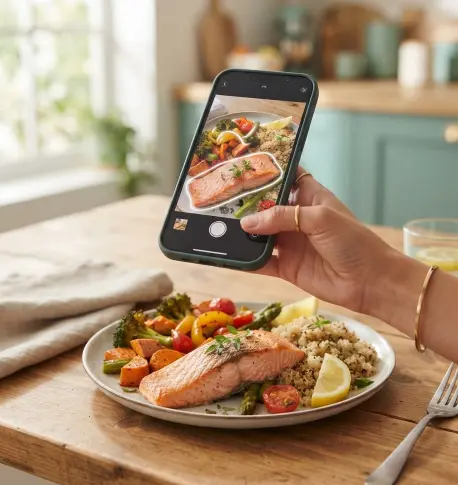 Scanning a plate of salmon, quinoa and roasted vegetables: the app outlines each food before estimating portions.
In my experience step five is the one that decides whether the numbers are any good. More on that below.
Most AI trackers still have the old tools too, like a barcode scanner, a food search, saved meals and daily targets. You'll end up using those a lot. The camera just saves you some typing.
Why Tracking Food Helps at All
Does writing down what you eat actually change anything? Mostly yes, though the research is messier than app marketing suggests.
A 2011 systematic review of self-monitoring in weight loss looked at 22 studies on tracking diet, exercise and body weight. It found a consistent link between self-monitoring and weight loss. People who tracked more tended to lose more. The authors were careful to say the evidence was weak in places, because many studies relied on self-report and the participants were mostly white women. So tracking isn't magic, and we don't know exactly how much of it you need. But the pattern keeps turning up.
Part of it is that we forget. Most of us are bad at estimating what we eat. In a well-known 1992 study of a small group of people with obesity who reported eating very little, the participants underreported their food intake by around 47 percent. That was one specific group, and the exact figure doesn't apply to everyone, but later research keeps finding that self-reported totals come out too low. Writing things down, or photographing them, catches some of what memory misses.
So tracking works mainly because it makes you notice what you eat. Which tool you use matters less than whether you keep using it.
How Accurate Are AI Food Trackers?
People ask me this more than anything else. It depends a lot on what's on the plate.
A 2023 systematic review in Annals of Medicine looked at 52 studies of AI-based photo estimates. Average calorie errors ranged from under 1 percent to about 38 percent, depending on the system and the food. Simple, single foods did best. The reviewers concluded AI estimates were broadly comparable to estimates made by trained humans, but not yet reliable enough to trust without checking.
An earlier 2020 meta-analysis of image-based food diaries found they tended to underestimate intake, much like written diaries do. Photos help, but they don't fix the problem of things that never make it into the photo.
In practice, accuracy follows a fairly predictable pattern:
- Easy: a banana, a boiled egg, a plate with meat, potatoes and vegetables clearly separated.
- Medium: sandwiches, grain bowls, simple salads where you can still see most of the parts.
- Hard: curries, stews, lasagne, pasta in a creamy sauce, burritos, smoothies.
- Nearly invisible: cooking oil, butter, dressings, sugar in coffee, the cheese melted into something.
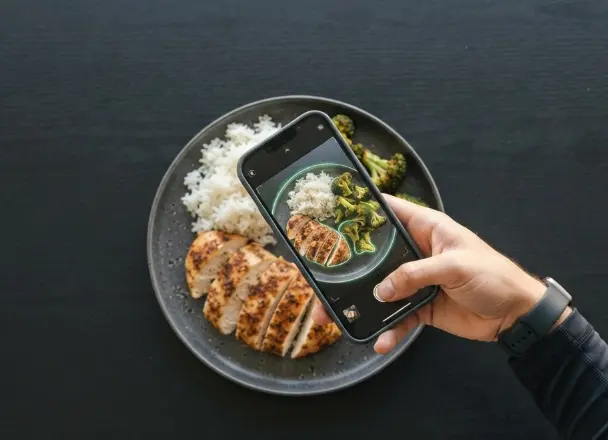 An easy plate for a photo scan: chicken, rice and broccoli are clearly separated, so each food can be recognised and portioned.
A tablespoon of olive oil is around 120 calories, and once it's soaked into roast vegetables you can't see it. Every photo app has this problem, mine included.
Try it yourself below. Build a plate, then remove the oil or double the rice and watch how much the total moves.
🍽️ Meal calorie estimator
Pick foods and enter portions in grams to see how each choice changes the total.
1 breast ≈ 150 g · 248 kcal
1 cup ≈ 180 g · 234 kcal
1 cup ≈ 100 g · 35 kcal
1 tbsp ≈ 14 g · 124 kcal
≈ 641 kcal estimated meal total
Rounded average values per 100 g, based on USDA FoodData Central. Real foods vary by brand and cooking method. This is an illustration, not a measure of any app's scan accuracy.
I'd take any accuracy percentage on an app's website with a pinch of salt. They're usually measured on neat test plates, and your Tuesday stir-fry won't look like those. I care more about how quickly I can fix a wrong estimate.
I wrote more about this, and how to take photos that give better estimates, in How to Count Calories From Photos.
What Makes a Good AI Food Tracker
This is my own checklist, most important first. If you'd rather see named apps next to each other, I keep a side-by-side comparison of food and fitness apps with features and pricing.
1. You can fix the results quickly
Every AI estimate will sometimes be wrong, so check how annoying it is to fix. After a scan, you should see each food separately, with its portion, and be able to:
- change the portion size with a tap or two,
- delete an item it got wrong,
- add something it missed, like the oil or a drink,
- swap a food for a better match.
If an app only shows you a single total for the whole plate with no way to adjust it, I'd walk away. You'll have no idea which part is off.
2. The logging is actually fast
You're using AI to save time, so time it. Log a normal lunch and count the seconds from opening the app to saving. If typing it in would have been quicker, the camera isn't helping.
Speed also depends on things outside the camera: how quickly the app opens, whether it remembers foods you eat often, and whether you can save a meal and log it again with one tap. Most people eat the same handful of breakfasts and lunches on repeat. Saved meals are often the biggest time saver of all.
3. A solid barcode scanner and food database
For anything in a package, a barcode is usually more accurate than a photo, because it reads the label instead of guessing. A good tracker should scan barcodes quickly and find most products in your country, not just in the US.
The food database matters for the same reason. When you search for "Greek yogurt 2%" or a local brand, you want to find it. A database full of duplicates and user-entered guesses makes everything slower and less reliable.
4. Clear targets that make sense for you
Logging food without a target just gives you numbers. You need to know what to compare them with. A decent app will estimate a daily calorie target from your age, height, weight, sex and activity, and set protein, carbohydrate and fat targets to go with it.
Look for an app that explains how it got those numbers and lets you change them. The formulas are based on averages, and your real needs might be a few hundred calories different. If your weight isn't doing what you expect after two or three weeks, you'll want to adjust the target yourself.
5. Protein, not just calories
Seeing protein helps a lot if you're losing weight. Fibre and sodium are nice to have. Forty micronutrients, probably not.
And if you already use another app for training, think about whether you want everything in one place or are happy with two apps. I wanted one, which is partly why I built my own.
Free vs. Paid: What You're Really Paying For
Almost every AI food tracker has a free version. What it includes varies a lot, so read the details rather than trusting the word "free" on the download page.
The limits have a boring reason. Every time you scan a photo, the app sends it to an AI model, and that costs the company real money. Typing "banana" into a database costs almost nothing. So most apps keep manual logging, barcode scanning and basic tracking free, and limit or charge for AI photo scans and AI coaching.
Common models you'll see:
- Free trial, then subscription. Everything unlocked for a few days, then you pay. Watch out for trials that start billing automatically.
- Free tier with limited AI. Basic tracking is free forever, with a set number of AI scans per day or month.
- Credits. You get a pool of credits, and each AI action uses some. This makes costs visible, but you need to know what each action costs.
- One subscription for everything. Unlimited use for a monthly or yearly fee.
I don't think one of these is clearly best. Before signing up I'd find out:
- What can I do for free, with no time limit?
- How many AI scans do I actually get on the free plan?
- What does the paid plan cost per month, and is the yearly price billed all at once?
- Do I need to enter card details to try it?
- How do I cancel, and is it easy?
Navilo Health uses credits. Tracking, barcode scanning and voice logging are free. A meal photo scan uses 2 credits, and new users get 10 credits to start. I chose credits because I'd rather show people what AI costs than hide it inside an "unlimited" plan that quietly gets more expensive.
Apple iOS or Google Android: Does It Matter?
Most of the bigger food trackers have an Apple iOS version and a Google Android version. They aren't always equally good, though. I check these things on my own phone:
Update history. Look at the "What's new" section in the App Store or Google Play. An app that hasn't been updated in six months on your platform is a warning sign. Apps that launch on one platform first sometimes lag on the other.
Camera speed. The photo scan depends on your phone's camera opening quickly. Try it a few times in normal kitchen light. If it's sluggish on your phone, it'll get annoying fast.
Health app connections. On Apple iOS, many apps can read or write data with Apple Health. On Google Android, the equivalent is Health Connect. If you want your steps, workouts or weight to flow between apps, check that the tracker supports the one on your phone, and read exactly which data it reads and writes.
Reviews from your platform. Ratings on the App Store and Google Play are separate. An app can do well on one and badly on the other because of platform-specific bugs. Read the recent reviews on the store for your phone, not just the overall star rating.
Older phones. If your phone is a few years old, check the minimum version the app needs. Some AI apps run noticeably slower on older hardware.
There's also the web. Some trackers work in a browser as well as on phones, which is handy if you want to look at your history on a bigger screen or plan meals on a laptop.
Privacy: What Happens to Your Food Photos?
A photo of your porridge doesn't seem very private. A year of them is a different matter. It shows when and where you eat, how much you drink, whether you're dieting, and sometimes your medication. So I'd read the privacy policy, at least for these points:
- Who processes your photos. Many apps send images to a third-party AI provider. That's normal, but the policy should say so.
- Whether your data is sold or used for advertising. Some free apps make their money this way.
- Whether you can delete your account and data from inside the app, without emailing support and waiting.
- What data the app asks for. A food tracker usually doesn't need your contacts or precise location. If it asks, there should be a clear reason, like GPS for run tracking.
- Where the company is based, which affects which privacy laws apply to you.
If the policy is so vague you still can't tell what happens to your photos, I'd pick another app.
Common Mistakes When Picking a Food Tracker
I've made most of these myself at some point.
Choosing by feature list. An app with eighty features isn't better if you only use four and the other seventy-six get in the way. Start with what you need every day: logging food quickly and seeing your totals.
Trusting every estimate. AI numbers are a starting point. A five-second glance at the portions before saving fixes most of the big errors.
Switching apps every few weeks. Each switch means re-entering your targets, losing your saved meals and breaking the habit. Give one app at least a month before deciding.
Paying for a year on day one. Yearly plans are cheaper per month, but only if you're still using the app in month eight. Try the free version or a monthly plan first.
Ignoring the boring parts. Barcode scanning, saved meals and a good search feel less exciting than AI, but they're what you'll use every day.
Forgetting drinks and snacks. No tracker can log what you don't tell it. Milk in coffee, juice, beer, the handful of nuts at your desk all count. Many people find a few hundred calories a day hiding here.
Making it about perfection. If tracking starts to make you anxious about eating, loosen up. Roughly right and consistent is good enough. And if it keeps feeling bad, it's fine to stop and focus on other habits instead.
How to Test an AI Food Tracker in One Week
Reviews only get you so far. I'd install the app that looks most promising and use it properly for a week, roughly like this.
Day 1: Set it up. Enter your details and look at the calorie and macro targets it gives you. Do they seem reasonable? Can you see how they were worked out and change them? For context, the NHS uses about 2,000 calories a day for women and 2,500 for men as rough averages, but your own number could be quite different.
Days 2 to 3: Scan everything. Photograph every meal, snack and drink. After each scan, note whether the foods were right and whether the portions looked about right. How often did you have to fix something? How long did fixing take?
Day 4: Test the hard stuff. Try a mixed dish, like a curry, a pasta bake or a stew. Then try a packaged food with the barcode scanner. Compare how each felt.
Days 5 to 6: If you have a kitchen scale, weigh one meal and compare it with the app's guess. Save your usual breakfast as a meal too, and see how much faster logging it again is.
Day 7: Look back. Open your history. Can you see the week at a glance? Did you actually enjoy using it, or did it feel like a chore? Did you hit the free limit, and if so, how quickly?
If you still like it on day seven, keep it. If you were dreading it by Thursday, try another one.
Getting More From Any AI Food Tracker
These habits help whichever app you use.
Photograph before you eat. Full plate, from above at a slight angle, in decent light, with the whole plate in the frame. A fork or knife in the shot helps with scale.
Check the portions, not just the names. The app usually gets the foods right. The portion is where it most often goes wrong. If it says 100 g of rice and you had a big bowl, change it.
Add the oil. If you cooked with oil or butter, add it. I add a tablespoon unless I know I used less.
Use barcodes for packaged food. It's more accurate and, in apps that limit AI scans, it saves your scans for meals that need them.
Look at the weekly average. Daily totals bounce around. One big Saturday doesn't undo a good week. Judge your progress, and your target, on the weekly picture.
Adjust after a few weeks. If your weight isn't moving the way you expected after two or three weeks, change your target by 100 to 200 calories and try again. For weight loss, the CDC describes gradual loss of about 0.5 to 1 kg (1 to 2 pounds) a week as the pace people are more likely to keep off.
If you're tracking to lose weight, the weight loss and fat burning guide goes into setting a sensible deficit. If you're trying to build muscle, the guide to gaining muscle covers protein and how big a surplus makes sense.
Where Navilo Health Fits
This is the part where I talk about my own app, so keep the bias in mind.
Navilo Health is a food and health tracker for Apple iOS, Google Android and the web. You can log meals with a photo, a barcode, your voice, a typed sentence or a regular search. After a photo scan you see every food with its portion, calories and macros, plus fibre, sugar and sodium, and you can edit anything before saving. You can save meals you eat often and log them again with one tap.
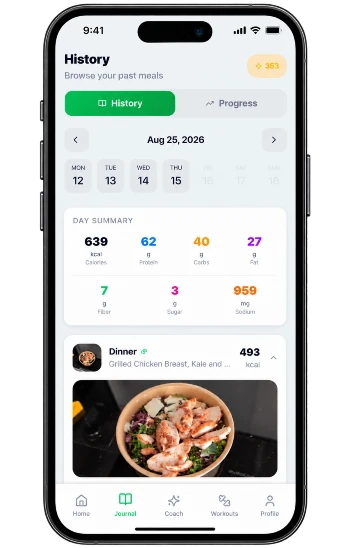 One photo of a grilled chicken and kale salad in Navilo Health, logged with calories, macros, fibre, sugar and sodium in the day's history.
It also tracks water, workouts, GPS runs and walks, sleep, steps and weight. If you only want a food diary, that's probably more than you need.
What's free: manual and barcode logging, voice logging, targets and all the non-AI tracking. AI features use credits. A meal photo scan uses 2, a coach message uses 1. New users start with 10 credits, and Premium adds a monthly allowance.
Where it's weaker: like every photo-based tracker, it can't see hidden oil or what's inside a stew, so you still need to check. And it's a younger app than the big names, with a smaller community around it.
You can see what the app does if you're curious. The checklist above works for any app, though.
Who Should Be Careful With Food Tracking
Food tracking isn't right for everyone.
If you have a history of disordered eating, or you notice that counting food makes you anxious or guilty, please talk to your doctor or a specialist before using any tracker. There are other ways to work on your health that don't involve numbers.
If you're pregnant or breastfeeding, have diabetes, take medication that affects your appetite or blood sugar, or have a long-term health condition, check any calorie target with your doctor first. Calorie targets in apps are built for healthy adults. The same goes for teenagers.
And a lower target is not a better one. Eating far below your needs is hard to keep up, makes it harder to get enough nutrients and often backfires with hunger later.
So, Which One?
Look for an app that logs a meal in a few seconds and lets you fix it when it's wrong. It should be clear about what's free and what isn't, and run well on your phone, whether that's Apple iOS or Google Android.
The AI saves time, but you still have to check it. Fix the portions, add the oil, scan barcodes when you can, and look at your weekly average. Give one app a proper week before you pay for anything.
Frequently asked questions
What is the best AI food tracker?
It depends on how you eat and what phone you have. Look for quick photo logging you can edit, a good barcode scanner, clear pricing and an app that runs smoothly on your own phone.
Are AI food trackers accurate?
Reasonably, for simple meals. A 2023 review of 52 studies found average calorie errors from under 1 percent to about 38 percent depending on the system and the food. Mixed dishes, sauces and cooking oil are where estimates go wrong most often, so check portions before you save.
Is there a free AI food tracker?
Many apps have a free tier. Usually manual logging and barcode scanning are free, while AI photo scans are limited or paid, because each scan costs the company money to run. Read what the free plan actually includes before you sign up.
Do AI food trackers work on both iPhone and Android?
Most of the well-known ones are available for both Apple iOS and Google Android. Check that the version for your phone gets regular updates and has similar features, as some apps launch new things on one platform first.
Is photo logging better than typing in my food?
It's faster, and for most people that matters more than precision. Typing and weighing is more exact, but slower. Many people do best with photos for home-cooked meals and barcodes for anything packaged.
Can an AI food tracker replace a dietitian?
No. An app can show you what you eat and how it adds up. It can't assess your health, medication or history. If you have a medical condition, are pregnant, or have a history of disordered eating, talk to a doctor or dietitian first.
Sources
- Shonkoff E, Cara KC, Pei XA, et al. AI-based digital image dietary assessment methods compared to humans and ground truth: a systematic review. Annals of Medicine, 2023.
- Ho DKN, Tseng SH, Wu MC, et al. Validity of image-based dietary assessment methods: a systematic review and meta-analysis. Clinical Nutrition, 2020.
- Burke LE, Wang J, Sevick MA. Self-monitoring in weight loss: a systematic review of the literature. Journal of the American Dietetic Association, January 2011.
- Lichtman SW, Pisarska K, Berman ER, et al. Discrepancy between self-reported and actual caloric intake and exercise in obese subjects. New England Journal of Medicine, December 1992.
- U.S. Department of Agriculture, Agricultural Research Service. FoodData Central. USDA, accessed October 2026.
- Centers for Disease Control and Prevention. Steps for Losing Weight. CDC, accessed October 2026.
- NHS. Understanding calories. NHS, accessed October 2026.
Spotted a mistake or an out-of-date number? Tell me and I'll check it.
Report an errorThis article is general information, not medical advice. Talk to a doctor before big changes to your diet or training.
Keep reading
Nutrition
How to Count Calories From Photos (and Pair It With a Calorie Calculator)
How photo calorie counting really works, how accurate it is, and how to combine it with a calorie calculator so the numbers actually mean something.
Weight
Weight Loss: How to Burn Body Fat and Keep It Off
A research-led guide to weight loss that actually lasts: how a calorie deficit works, what to eat, how to train, and when to talk to a doctor first.
Training
How to Gain Muscle: The Complete Guide to Building Muscle
How muscle actually grows, and the training, food and sleep habits that make it happen, explained without the gym-bro myths.