
What's New
This is where we keep a record of every Navilo Health update: new features, fixes and the small things that make day-to-day tracking easier.
Many of these changes started as ideas from people using the app. If something here makes your routine simpler, or you think something is still missing, tell us on the feature requests board. We read every suggestion.
The newest updates are at the top. Each one lists the date it shipped and a short note on what changed.
18 October 2026
v1.10A better coach, progress sharing and cardio logging
The coach now compares this week with last week, so it can spot patterns like "you slept less, and the evening snacking crept in" instead of just reading out today's numbers.
Write a short note about what you want help with, like "more protein, no time for long workouts", and the coach keeps it in mind. After a chat you often get one or two small things to try. Thumbs up or down teaches it what works for you.
Under each answer you can see which logs it used, and photo-scan values are marked as estimates. Tap the shield icon to hide anything you would rather keep private.
Premium members get a Sunday check-in at 18:00 with a look back at the week and one thing to focus on. It costs 1 credit and can be turned off. The coach is not a doctor, so for anything medical, talk to a real one.
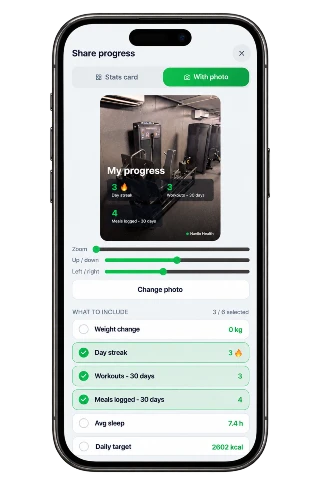
You can also share your progress as an image, either a stats card or your own photo with the numbers on top. It is made on your phone, and your first share earns 5 credits.
Cardio like running, swimming and cycling is now logged by distance and time. You can lock your dashboard layout under Profile, and the whole app is now translated into all five languages.
- • The coach looks at your whole week, not just today
- • Tell the coach what you are working on and it sticks to that
- • Small next steps you can thumbs-up or thumbs-down
- • You decide what the coach can see (shield button)
- • Premium: a Sunday coach check-in at 18:00, 1 credit a week
- • Share your progress as an image, and get 5 credits the first time
- • Log running, swimming and other cardio by distance and time
- • Lock your dashboard layout from your profile
- • The whole app is now translated into all five languages
9 October 2026
v1.09Set types and supersets
In a live workout, tap a set number to mark it as a warm-up (W), drop set (D) or set to failure (F). Warm-ups are left out of your top weight, so your records stay accurate. You can also link exercises into a superset with the new link button, and these labels show up in your workout history.
- • Mark sets as warm-up, drop set or failure during a live workout
- • Link exercises into supersets
8 October 2026
v1.08Every activity, smarter notifications and a new Articles hub
The workout logger now covers far more than strength training. Search a full A–Z list of activities, from padel to swimming to yoga, and log them in a couple of taps. Notifications got their own settings page, so you choose which reminders reach you and switch off the ones you do not want. Dashboard customization moved into settings, where you can reorder or hide any card. Meal sharing now creates a sharp, good-looking image instead of a blurry screenshot. On the website there is a new Articles section, written by real people, with calculators built right into the articles, and we made the site load noticeably faster on mobile.
- • Log any activity from a searchable A–Z list, not just gym lifts
- • New notification settings: pick which reminders you get and mute the rest
- • More control over your dashboard: reorder or hide any card from settings
- • Share a meal as a crisp image card
- • New Articles section with built-in protein and calorie calculators
- • Faster website, especially on phones
8 September 2026
v1.07Kilos or pounds — your choice
Weight units are now truly app-wide. Choose kilograms or pounds once under Body Stats in your profile and every screen follows it: workout logging, personal records, strength levels, the calculators and your progress charts. Switching also converts your numbers properly — your current and target weight keep the same real body mass instead of being relabelled, and past weigh-ins are re-scaled on the progress chart so the trend line never mixes units. Alongside that, the Workouts tab gained a set of strength calculators — estimate your one-rep max from any set, see where your lifts land against population strength standards, and compare two lifts to spot imbalances — plus a new Exercise Library with form guides organized by muscle group.
- • Pick kg or lbs once in your profile and the whole app follows — workouts, records, calculators and progress
- • Switching units now converts your weights instead of just swapping the label
- • New strength calculators: 1RM estimator, strength percentiles and a lift comparison
- • New Exercise Library with guides grouped by muscle group
1 September 2026
v1.06Smoother on your phone
This release is all about day-to-day comfort on your phone. The app now tells you when it has been updated: a small banner appears once per release and takes you straight to this page — and only shows again when there is something new. The AI coach chat got a proper full-width message box (it used to be squeezed down to a couple of words between the buttons), History and Progress were merged into a single Journal tab so your bottom navigation stays clean, and we fixed a handful of layout overflows on smaller screens.
- • New update notice — a small banner tells you when the app has news, with one tap to read them
- • Coach chat message box is now full width on phones, so you can read what you type
- • History and Progress live together in the new Journal tab
- • Fixed small layout overflows on smaller phone screens
24 August 2026
v1.05Bike rides in the GPS tracker
The GPS tracker is no longer just for runs and walks: pick Bike before you start and track your ride on the same live map, with time, distance, speed and per-kilometer splits updating as you go. Rides are saved with their own summary and show up clearly in your session history, and your weekly progress email now estimates cycling calories using a rate that actually fits riding instead of running. We also fixed the startup splash screen, which could flash while the app loaded.
- • Cycling added to the GPS tracker — run, walk or bike
- • Bike rides get their own history cards and finish summary
- • Weekly reports now estimate ride calories with a cycling-specific rate
- • Smoother app startup — no more flashing splash screen
20 August 2026
v1.04Run Tracker (beta)
The big one: a built-in GPS Run Tracker (beta). Start a run or walk and watch your route draw on a live map with real-time pace, speed and per-kilometer splits — no credits needed, ever. You can pause mid-session, your screen stays awake automatically, and a hold-to-unlock guard prevents accidental taps while you move. When you finish you get a proper summary with your stats, an XP reward, and the option to ask the AI coach for a personalized insight on your session. Your last 7 days of runs and walks now also show on the Progress page, and the Profile page has a new plain-language breakdown of exactly which features use credits — and everything that stays free.
- • New GPS Run Tracker — track runs and walks on a live map, completely free
- • Live stats with pace, speed and per-km splits, plus a summary when you finish
- • Pause and resume mid-session, and your screen stays awake while tracking
- • Optional AI coach insight on any saved session (1 credit)
- • Weekly run & walk totals on the Progress page
- • New "What uses credits" overview on your Profile
9 July 2026
v1.03Faster dashboard
We reworked how the dashboard loads its data behind the scenes, so it now appears noticeably faster — especially on slower connections. We also went through the entire app in light mode and fixed dozens of colors and contrast issues, so everything is just as readable whether you prefer light or dark.
- • Dashboard now loads noticeably faster
- • Improved light mode colors throughout the app
28 June 2026
v1.02Sleep improvements
The Sleep Talk Recorder received a round of polish and bug fixes for more reliable overnight recording. You can now also go back and edit past sleep entries and daily mood check-ins directly from the History page — so a mistyped night no longer messes up your averages.
- • Sleep Talk Recorder polish and fixes
- • Sleep and mood history can now be edited on the History page
15 June 2026
v1.01Badges & rewards
We added a whole set of new badges for streaks, consistent logging, protein goals and workouts — each one rewards you with credits when earned. There is also a new Daily Mystery Box on the dashboard: open it once a day for a chance at credit rewards, with rare boxes holding jackpots of up to 50 credits.
- • New badges with credit rewards
- • Daily Mystery Box with rare jackpots
Latest articles
All articlesNutrition
How to Choose the Best AI Food Tracker for You
How AI food trackers work, how accurate photo calorie estimates are, and what to check on iPhone or Android before you choose one. Includes a meal calculator.
Nutrition
How to Count Calories From Photos (and Pair It With a Calorie Calculator)
How photo calorie counting really works, how accurate it is, and how to combine it with a calorie calculator so the numbers actually mean something.
Weight
Weight Loss: How to Burn Body Fat and Keep It Off
A research-led guide to weight loss that actually lasts: how a calorie deficit works, what to eat, how to train, and when to talk to a doctor first.
Training
How to Gain Muscle: The Complete Guide to Building Muscle
How muscle actually grows, and the training, food and sleep habits that make it happen, explained without the gym-bro myths.